It’s the bleeding edge future of tech: writing stuff out by hand. Find out about a neat app and why your super-fast computer actually slows you way down.
Yes. I got an iPad.
Note: This post was originally posted onto Capella’s public blog: FreeThinkingFriday.com – The blog has been pulled from the public and given internal-access-only at: http://meteor.capella-id.com

I don’t own an iPad (this hasn’t stopped me from pre-ordering a Touch Pen Polymer from LunaTik). But 53’s new(ish) app, Paper, may be the thing that pushes me to pick one up (that and the fact that I’ll already have a handy stylus/pen-thingie).
While Paper’s pricing has a few users disgruntled, the app itself gives me hope that my dream of a genuine paperless sketchbook is finally here (or at least very close at hand).
I do feel strongly that all designing/planning/conceptualizing should happen on (real) paper FIRST – before ever looking at a screen. No, it’s not a “hard-core/old school” designer thing – I’ve just come to believe that attempting to capture and organize any deep, creative or problem-solving work via any software’s interface – no matter the device – slows down and can even kill the creative/conceptualizing/problem-solving process.
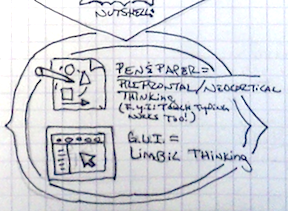
It’s a lengthy explanation, but I’ll attempt to nutshell it:
A GUI (aka: Graphic(al) User Interface) activates your brain’s limbic system, and that’s not necessarily a good thing – depending on what type of thinking you need to do. While we can dual process plenty between our brain’s left and right hemispheres, apparently we can’t dual process very well between the limbic system and our super-cool neocortical systems (this is according to current Neuro/Sci types like Jeff Hawkins and John Medina).
You probably know that the neocortex (aka: “grey matter”) of our brain is essential for our rich “when”, “why” and “complex how/how much” thinking. Not to mention our linguistic capabilities, imagined visualization abilities and executive functions which fuel and direct all that awesome thinking.
Our limbic system sits just under those 6 neocortex layers and primarily handles “what” and “where” processing along with rudimentary “how/how much” processing. This is uber-handy for navigating our environment and core survival, hence it’s (rightly) easily visually stimulated.
As a result, our limbic system totally ❤s software GUIs.
This is your brain on GUIs:
“What do I need to capture or represent this?”, – navigate through options – “Where is it again in this app?”, – navigate through more options – “How do I…” “Oh! oooh! I see it! I see it!” – click (or touch) – “Easy!” “Now… but, what was I thinking?!! hmmm… ”.
Any questions?
According to Dan Roam (referencing Jeff Hawkins’ work), drawing and writing directly with pen and paper* keeps you in this “higher”, neocortical, creative thinking mode for longer durations than if you were working through a software’s GUI, essentially, “looping” your thought processes from neocortical to limbic and back.
Capturing and processing deeply creative work via a robust application interface is essentially “mental multi-tasking”. It forces you to gear shift every time you have to switch between the two types of thinking, effectively interrupting your creative/problem-solving workflow. Yes; multi-tasking, being interrupted, shifting gears and losing context – all the things the productivity experts tell us to avoid!
Hence, I’ve come to the conclusion that if you want to be as productive as possible, do the “real” work by hand with pen and paper first. Your desktop, laptop and various mobile devices are really just tools to be used for: communication, media consumption and once you have it all planned out, production. They do not aid your true genius and creativity in any way (no matter what the app’s marketing tells you).
That said, Paper looks promising: Practically no GUI at all and when you do reference the interface to switch tools, it appears to work more “naturally” – similar to simply picking up a different pen and “flipping” over a fresh sheet. As for other uses, looks like exporting images to just about anything is a breeze so the sky’s the limit. I hope future upgrades bring the ability to swap/share journals with other Paper users (my Evernote account will get jealous). Ah, and exporting a journal into an iBook would be pretty great as well.
iPad users: If you’ve got Paper, let me know if it’s worth picking up my first iPad!
Update: Never-mind. Got it. Love it. However, it still has its drawbacks. I can’t say I’m truly “paperless” yet, but that’s another post.
*Non-doodler’s FYI: According to Jeff Hawkins, being able to touch-type without looking at the screen or keyboard keeps you in this “higher” thinking mode as well (a coincidence that all the hottest “productivity writing apps” out there simply give you a screen with your text and no interface options?) – but do check out Dan’s work; he makes the case that drawing visual images to design, capture, plan and problem solve has clear advantages over words.